Table of contents
Open Table of contents
Review of the Old Pipeline
Before we get into the new, lets have a quick review of the old. My old stack can be summed up to this order of events:
My Device
- Write blog post in Obsidian
- Remotely Save plugin syncs file to Nextcloud
On Github
- On schedule (twice a day)
- Set up Nextcloud client (rclone)
- Find anchor file
!BLOG_POSTS!.mdto find blog posts folder - Pull posts into repo
- Process image links in markdown
- Pull attached images into repo
- Commit & push
 diagram of the old pipeline
My problems with this setup, especially after switching to Syncthing for my syncing needs, was that it depended on getting my notes into Nextcloud. This was nowhere near as convenient It was a clear next dependency to remove from the pipeline. Also, all the credentials to connect to my entire Nextcloud instance would be saved and used in GitHub.
What’s The Next Solution?
I originally thought of trying to refactor the existing GitHub action to connect to my Syncthing network. After all, it would be a more drop in replacement that would require less change in my existing setup. Just replace Remotely Save and Nextcloud with Syncthing!
Hmm…but is this good opsec?
NO! Well, it depends. Think about it. With Syncthing, your entire Obsidian vault would be copied onto a GitHub actions runner, and the credentials to do it would be saved in GitHub.
Since I keep my blog posts in the same vault as my personal notes, I said no thanks to this strategy as I want to keep my notes locked down as much as reasonably possible. Also, it has never been done before (to my knowledge) and I would be paving the way in getting Syncthing to work in a GitHub action.
After coming to this conclusion for this new pipeline, I have to acknowledge that my previous setup where GitHub Actions would connect to my notes via Nextcloud wasn’t any better and was probably a big oversight in terms of privacy and opsec. You live and you learn.
This is when I started thinking up a push strategy coming from a machine in my homelab.
Push vs Pull Strategy Comparison
| Aspect | Pull Strategy (GitHub Actions) | Push Strategy (Self-Hosted) | Winner |
|---|---|---|---|
| Privacy | GitHub has credentials to your vault; vault contents on GH runners | Your server only; GitHub sees only committed posts | Push |
| Infrastructure | None required (GitHub hosts) | Needs 24/7 server (Oracle Cloud, home server, VPS) | Pull |
| Setup Complexity | Configure GitHub Actions, store secrets | Docker container, server setup, scheduling | Pull |
| Ongoing Costs | Free (GitHub Actions free tier) | Free tier cloud VM or existing hardware | Tie |
| Real-time Sync | Scheduled (freq. limited by GH action minutes) | Scheduled (any time you want) | Push |
| Failed Sync Visibility | GitHub Actions logs | Coolify logs or server logs | Tie |
| Dependency Count | GitHub + Nextcloud + Obsidian plugin | Syncthing + Coolify/Docker | Push |
| Backup/Recovery | GitHub history | GitHub history (same) | Tie |
| Mobile Editing | Works (sync to cloud) | Works (Syncthing) | Tie |
For my personal setup, the win for the push strategy comes mainly from the dropped dependencies and the privacy aspects.
The Push Strategy
So the basic idea is this. I write my notes on my laptop in Obsidian. With Syncthing, my notes get synced up to my always on server. Then, on a schedule, a script that takes care of the pushing gets run.
At a high level, that script is responsible for the following:
- Set up git credentials and clone blog repo
- Find anchor file within vault (
!BLOG_POSTS!.md) - Sync obsidian blog post notes to blog repo
- In each post convert image wikilinks to markdown links
- Sync images that are referenced in posts to blog repo
- Commit and push
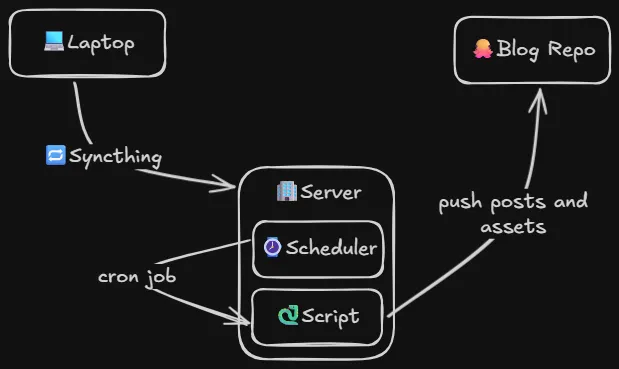 A quick sketch of what I wanted in my Obsidian to blog pipeline
It’s pretty similar to the script from the pull strategy, except we are dealing with git instead of Nextcloud
Technical Execution
Now that we have a basic understanding of what we are trying to do, let’s get into the execution of setting up this workflow.
As I’ve talked about in my post about Syncthing and Obsidian, I have a VM in Oracle Cloud that is running 24.7, and acting as a persistent Syncthing node. This makes it a perfect place to have this script run on a schedule.
Since I’m running Coolify on this VM, I want to be able to view logs and control deploys, and set the scheduled sync job through Coolify’s WebUI. This means that dockerizing my solution would offer me the best experience.
So now the idea is this: Have a docker container running, idling, until Coolify’s scheduling system attaches and runs the script to push posts up to the blog repo.
Using Docker as an Always on Machine
This was my first challenge. I’ve never had a docker container just running as another “machine” to attach to. The entire point of docker to my understanding is one process per container. No process, no container.
I don’t think this is an ideal use of docker, but that’s not important to me right now, getting something working is.
The solution to this is pretty simple. Just have your container sleep indefinitely 😅
FROM alpine

CMD ["sleep", "infinity"]
This allows the container to stay running and allow me to attach to it to figure out what I all need to get this working.
After attaching to the container with docker exec -it <container name> /bin/sh, I began setting up my script and noting down all the requirements for smooth execution:
- Rsync, Python and Git installed
- Various env vars
- Repo url
- Git username, email, personal access token
- Source dirs and destination dirs
- Anchor filename
- Astro image link prefix
- Sync posts script (with executable flag!)
Here’s my final Dockerfile that has everything I needs
FROM alpine

ENV SOURCE_DIR=/data
ENV ANCHOR_FILENAME=!BLOG_POSTS!.md
ENV REPO_URL=
ENV GH_PAT=
ENV DEST_POSTS=src/data/blog
ENV DEST_ATTACHMENTS=src/assets/blog
ENV ATTACHMENT_PREFIX=@/assets/blog
ENV GIT_EMAIL=action@github.com
ENV GIT_NAME="Sync Posts Bot"

WORKDIR /app

RUN apk add --no-cache rsync python3 git

COPY . .

RUN chmod +x sync-posts.py

CMD ["sleep", "infinity"]
Now it’s ready to be deployed in Coolify. But what’s in that script?
The Sync Posts Script
You can find the up to date contents of the script here, but for this post, this is what I have in the script:
#!/usr/bin/env python3

import argparse
import os
import re
import shutil
import subprocess
from pathlib import Path

IMAGE_EXTENSIONS = ["png", "jpg", "jpeg", "gif", "webp"]
TEMP_REPO_DIR = Path("/tmp/blog-repo")
COMMIT_MESSAGE = "Update blog posts"


class Config:
    def __init__(self):
        self.source_dir = Path(os.environ["SOURCE_DIR"])
        self.anchor_filename = os.environ["ANCHOR_FILENAME"]
        self.repo_url = os.environ["REPO_URL"]
        self.gh_pat = os.environ["GH_PAT"]
        self.dest_posts = os.environ["DEST_POSTS"]
        self.dest_attachments = os.environ["DEST_ATTACHMENTS"]
        self.attachment_prefix = os.environ["ATTACHMENT_PREFIX"]
        self.git_email = os.environ["GIT_EMAIL"]
        self.git_name = os.environ["GIT_NAME"]


def run_command(args, cwd=None, check=True):
    return subprocess.run(args, cwd=cwd, check=check)


def log(message):
    print(message)


def clone_and_setup_repo(config):
    auth_url = config.repo_url.replace("https://", f"https://{config.gh_pat}@")

    run_command(
        ["git", "clone", "--filter=blob:none", "--sparse", auth_url, TEMP_REPO_DIR]
    )
    run_command(["git", "sparse-checkout", "init"], cwd=TEMP_REPO_DIR)
    run_command(
        ["git", "sparse-checkout", "set", config.dest_posts, config.dest_attachments],
        cwd=TEMP_REPO_DIR,
    )

    log(f"Repository cloned and setup in {TEMP_REPO_DIR}")

    return TEMP_REPO_DIR


def find_anchor_file(config):
    for f in config.source_dir.rglob(config.anchor_filename):
        log(f"Anchor file found in {f}")
        return f
    raise FileNotFoundError(
        f"Anchor file {config.anchor_filename} not found in {config.source_dir}"
    )


def sync_posts(config, anchor_path, repo_dir):
    source_path = config.source_dir / anchor_path.parent.name
    dest_path = repo_dir / config.dest_posts

    rsync_result = run_command(
        [
            "rsync",
            "-av",
            "--delete",
            "--exclude",
            config.anchor_filename,
            f"{source_path}/",
            f"{dest_path}/",
        ]
    )
    log(
        f"Rsync result: {rsync_result.returncode} {rsync_result.stdout} {rsync_result.stderr}"
    )

    return dest_path


def process_images_in_posts(posts_dir, config):
    images = set()
    image_pattern = r"\[\[!?([^]|]*\.(?:{}))\]\]".format("|".join(IMAGE_EXTENSIONS))

    for post_file in posts_dir.glob("*.md"):
        content = post_file.read_text()

        def replace_image(match):
            src = match.group(1)
            src = src.lstrip('!')

            images.add((src, post_file))
            image_path = Path(src)

            markdown_image = f"[{image_path.name}]({config.attachment_prefix}/{image_path.name.replace(' ', '%20')})"
            log(f"Link changed in {post_file.name}: [[{src}]] → {markdown_image}")
            return markdown_image

        content = re.sub(image_pattern, replace_image, content)
        post_file.write_text(content)

    log(f"Images processed in {posts_dir}")
    return images


def resolve_image_path(src, post_file, config):
    image_path = config.source_dir / src

    if image_path.exists():
        return image_path

    raise FileNotFoundError(
        f"Image not found: {src}\n"
        f"Expected at: {image_path}\n"
        f"Post file: {post_file}"
    )


def sync_images(images, repo_dir, config):
    dest_attachments_path = repo_dir / config.dest_attachments

    for src, post_file in images:
        src_img = resolve_image_path(src, post_file, config)
        log(f"Syncing image {src_img} to {dest_attachments_path}")
        run_command(["rsync", "-av", str(src_img), str(dest_attachments_path)])


def commit_and_push(repo_dir, config, no_commit=False):
    if no_commit:
        log("Skipping commit due to --no-commit flag")
        return

    run_command(["git", "add", "."], cwd=repo_dir)

    result = run_command(
        ["git", "diff", "--cached", "--quiet"], cwd=repo_dir, check=False
    )
    if result.returncode == 0:
        log("No changes to commit")
        return

    run_command(["git", "config", "user.email", config.git_email], cwd=repo_dir)
    run_command(["git", "config", "user.name", config.git_name], cwd=repo_dir)
    run_command(["git", "commit", "-m", COMMIT_MESSAGE], cwd=repo_dir)
    run_command(["git", "push", "origin", "HEAD"], cwd=repo_dir)


def cleanup_repo(repo_dir, no_cleanup=False):
    if no_cleanup:
        log(f"Skipping cleanup, repo left at {repo_dir}")
        return

    if repo_dir.exists():
        shutil.rmtree(repo_dir)
        log(f"Repository cleaned up in {repo_dir}")


def main():
    parser = argparse.ArgumentParser(description="Sync blog posts and images")
    parser.add_argument(
        "--no-commit", action="store_true", help="Skip committing changes"
    )
    parser.add_argument(
        "--no-cleanup", action="store_true", help="Leave repo in tmp folder"
    )
    args = parser.parse_args()

    config = Config()

    repo_dir = clone_and_setup_repo(config)
    anchor_path = find_anchor_file(config)
    posts_dir = sync_posts(config, anchor_path, repo_dir)
    images = process_images_in_posts(posts_dir, config)
    sync_images(images, repo_dir, config)
    commit_and_push(repo_dir, config, no_commit=args.no_commit)
    cleanup_repo(repo_dir, no_cleanup=args.no_cleanup)


if __name__ == "__main__":
    main()
AI helped me clean up and make things readable, as well as providing some thoughtful logging to help me debug issues. The main() function keeps it high level, but here’s a simple breakdown of the script.
- Sparse checkout the blog GitHub repository (
REPO_URL) using the access token (GH_PAT) into a temporary folder - In my Obsidian vault (
SOURCE_DIR), search for theANCHOR_FILENAME - Sync posts from the source path + anchor path to the repo path +
DEST_POSTS - Resolve Obsidian wikilink images to an AstroJS path using
ATTATCHMENT_PREFIXand markdown link syntax - Sync relevant images to repo path +
DEST_POSTS - Set up
GIT_EMAIL,GIT_NAMEand commit and push to blog repository - Cleanup and delete temp blog repo folder
Coolify Setup
Okay the truth is, I set this part up before doing the above. I was just pushing changes to the Dockerfile and letting Coolify deploy, then used their integrated terminal to figure out what needed to be done for this sync posts script.
The build setup was simple. In my blog repo, I put this posts syncing project in a new folder /sync-posts, then pointed Coolify to watch for any changes in that dir, and pointed it at that Dockerfile.

Next, I had to make sure it had access to my Obsidian vault by adding a bind mount via the Persistent Storage page.
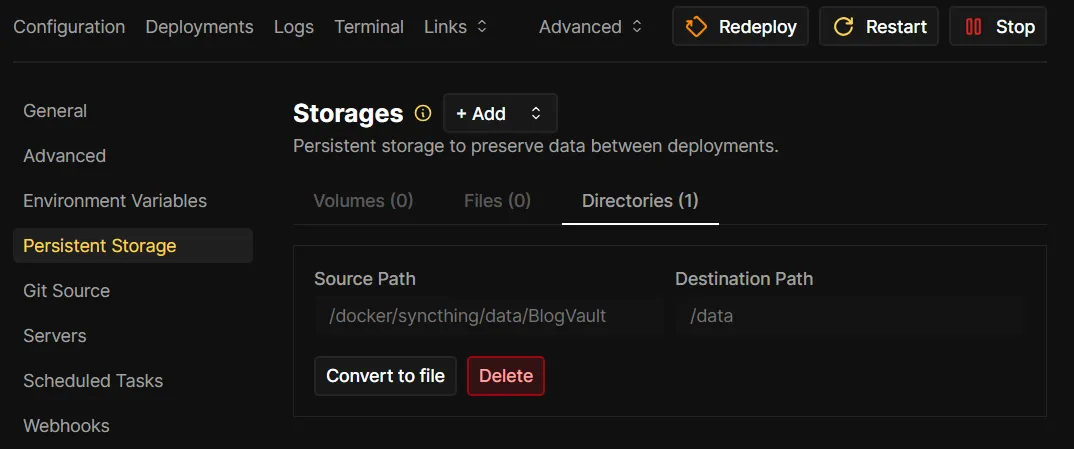
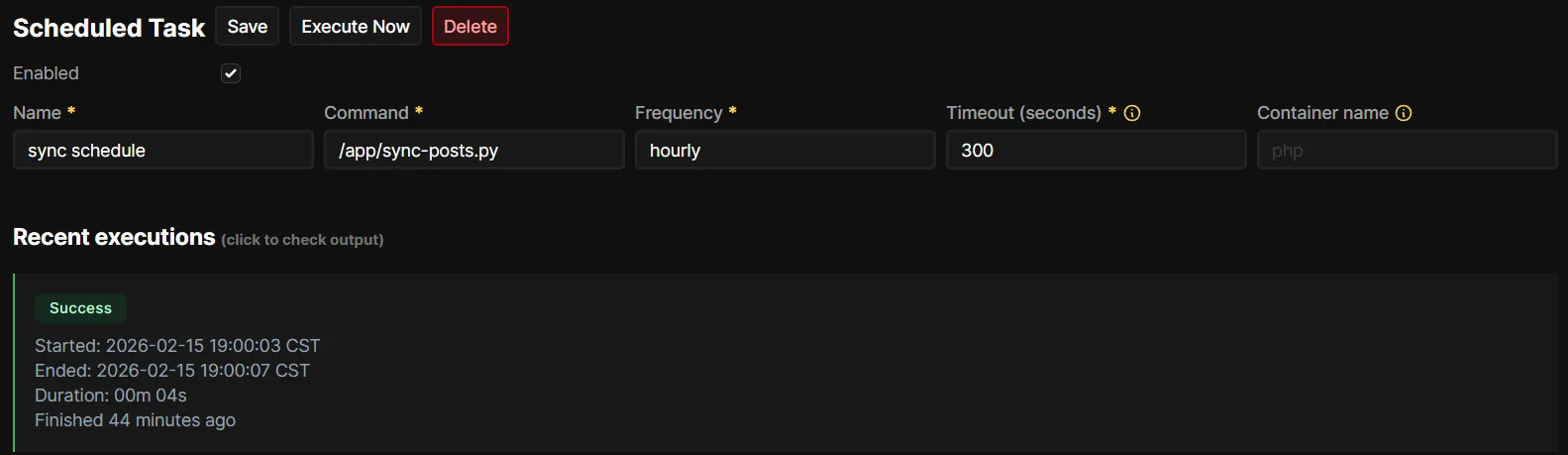
Once the container was up and running in Coolify, and I confirmed that all the requirements for the script were in place, and logging in, running the script with /app/sync-posts.py (multiple times) would all work as expected, I moved on to setting up the schedule. I set it up to run hourly.
Architecture Overview
Now, on an hourly basis, Coolify will run my script inside an alpine container to sync my posts! Here’s the high level overview of what the pipeline looks like now.
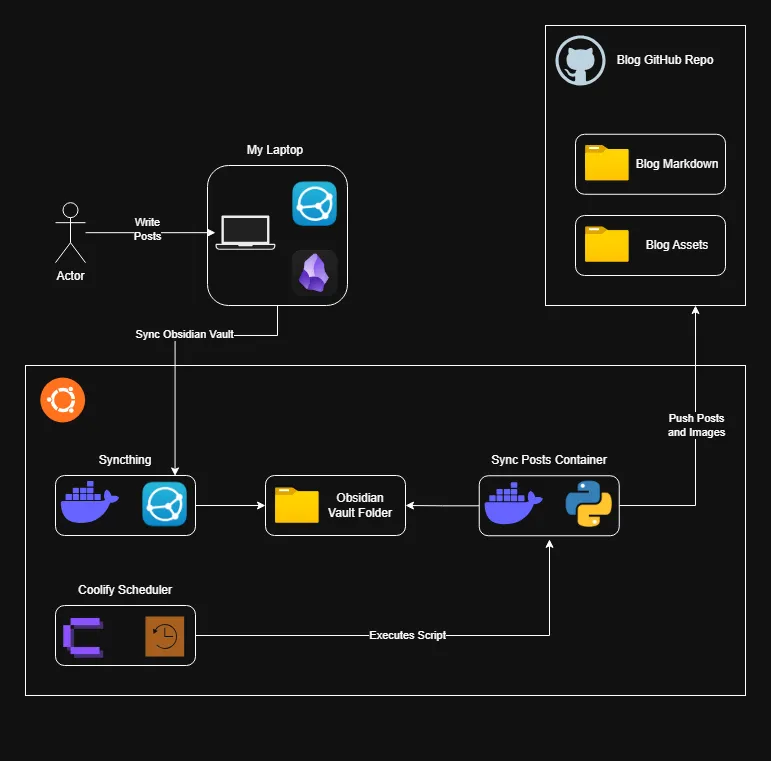
This setup removes a ton of friction that I experience when managing a blog. No more worrying about GitHub actions having all my notes, no more dependency on Nextcloud and Remotely Save. All my posts kept in sync with my Obsidian notes allows me to have the best experience writing, and making small updates to existing posts quick and effortless.
This setup isn’t for everyone, and it certainly isn’t perfect. It requires more infrastructure with an always-on server, some Docker knowledge, and a bit more configuration. But if you’re already running a Docker based homelab, it could be a decent solution that keeps your data under your control.
For more info and complete code, check out the sync-posts/ folder in my blog repository. If you end up adapting this for your own setup, I’d love to hear about it!